

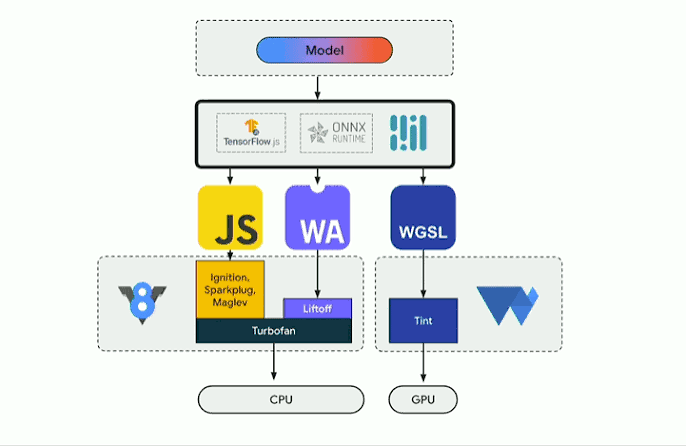
Here's a thought experiment I keep coming back to: what if your AI feature had no server bill at all? Not a smaller one — zero. No GPU instances to provision, no autoscaling rules to babysit at 2 AM, no egress charges for every user who uploads a photo. The model just… runs on the user's own device, inside the browser tab they already have open.
That stopped being science fiction about two years ago, and in 2026 it's genuinely boring technology — which is the best compliment I can give it. WebGPU shipped by default in all four major browsers, Transformers.js hit v4, WebLLM compiles real LLMs into GPU shaders you load with a few lines of JavaScript, and Chrome ships its own built-in AI model you don't even have to download. I've built with all of these, and the honest take is: for a huge class of features — transcription, image tagging, semantic search, document QA, translation — running the model client-side is now the default sane choice, and reaching for a server is the thing you need to justify.
This article is the architecture guide I wish I'd had: the runtimes, how they actually perform, what to build with each, and where the walls are. All code patterns are real; all performance figures come from published benchmarks and community measurements, not marketing pages.
Why the economics flipped
The old math was simple: models are heavy, browsers are weak, so inference lives on a server. WebGPU broke that bargain — real compute shaders and direct GPU memory access, roughly an order of magnitude faster than WebGL-era hacks for transformer workloads.
The economic consequence is what matters. Server-side inference costs scale with users; client-side inference is a fixed cost: you serve static model weights once (cached by the browser), and the marginal cost per inference is zero. One widely-cited comparison puts a 4B browser model at $0 per million tokens against roughly $1.25 in / $10 out per million for a flagship cloud API. Add latency (no round trip, no cold starts — the model is already warm in the tab) and privacy (user data never leaves the device, deleting whole categories of GDPR compliance work), and the case is overwhelming for a huge class of features.
The runtime landscape in 2026
There isn't one "browser AI" — there are four or five distinct runtimes, each with a different personality. Picking wrong is the most common mistake I see, so let's be precise.
1. Transformers.js (v4) — the generalist workhorse
Hugging Face's Transformers.js is the closest thing the browser has to a standard library for ML. The API will feel instantly familiar if you've used the Python library:
pipeline('automatic-speech-recognition', 'Xenova/whisper-small', { device: 'webgpu' }) — and you're transcribing audio in the tab. That one line captures the whole value proposition: pick a task, pick a model from the 1,200+ pre-converted ONNX checkpoints on the Hub, pick an execution backend (WebGPU, WASM, or the emerging WebNN), and go.
Its strength is breadth. Text, vision, audio, embeddings, OCR, zero-shot classification — it covers all of them, and v4 added serious vision-model support. Its weakness is that it's a general-purpose ONNX runtime, not a hand-tuned LLM engine: for chat-style LLM decoding it's slower than the purpose-built engines below. Rule of thumb: Transformers.js for perception tasks (audio/vision/embeddings/classification), something else for chat LLMs.
2. WebLLM (MLC) — the chat speed demon
WebLLM takes a different approach: instead of interpreting ONNX graphs at runtime, it compiles the whole model ahead of time into optimized WebGPU shaders. The result is the fastest LLM inference in a browser tab — a 4-bit Qwen3-4B generates 60–90+ tokens per second on modern hardware, Llama 3.1 8B hits ~41 tok/s on an M3 Max, and small 1–2B models routinely do 30–120 tok/s. The project reports roughly 80% of native inference performance, a staggering figure for something running inside Chrome.
The trade-off: you can only run MLC-compiled models (the catalog covers Llama, Qwen, Gemma, Phi, Mistral, DeepSeek distills, ~135M to 8B+ parameters), and a 4B model needs ~2.2GB of GPU memory while an 8B needs ~4.5GB. Fine on a modern laptop; on a five-year-old Chromebook, stick to the 1B tier.
3. wllama — the compatibility play
wllama is llama.cpp compiled to WebAssembly. No WebGPU required, no compiled model catalog — it runs any GGUF model, which means access to the enormous GGUF ecosystem (hundreds of thousands of community quantizations). The catch is speed: WASM SIMD on CPU gives you a few tokens per second for 1B-class models. That's genuinely usable for embeddings, tiny classifiers, and background summarization — but it's not a chat experience. I reach for wllama when the feature must work in every browser, including the ones where WebGPU is disabled or absent.
4. Chrome's built-in AI — the zero-download option
This one changes the calculus completely. Chrome now ships Gemini Nano built into the browser itself, exposed through the Prompt API. Your app ships zero model files — no 2GB download, no first-run wait, no cache management. It's stable for extensions since Chrome 138, with web-page availability rolling out.
The model quality is roughly 3–4B class, and it's Chrome-only — a real constraint for Safari/Firefox users. The pattern production apps are converging on: feature-detect built-in AI first, fall back to Transformers.js or WebLLM. Never make it a hard dependency — Chromium forks and other browsers won't have it.
5. WebNN — the coming native layer
Worth knowing about even though it's not the 2026 default: WebNN is the W3C API that routes inference to the OS's native neural stack (DirectML on Windows, Core ML on macOS). Think of it as the browser's version of TensorRT — no hand-written GPU kernels, the platform handles acceleration. It's still behind flags in Chromium, but Transformers.js already lists it as a backend, and when it stabilizes it'll likely become the best "just run it fast everywhere" option.
What to actually build: patterns that work
Theory is cheap. Here are the architectures I've seen work in production, with the runtime choice that fits each.
Live transcription and captioning
Whisper via Transformers.js with device: 'webgpu' and a WASM fallback is the canonical example — there's a real Chrome extension that overlays live Japanese subtitles on X videos this way, running Whisper locally for speech recognition and Chrome's built-in Nano for translation, with zero audio ever leaving the machine. Four Whisper sizes (tiny through turbo) let you trade accuracy for speed per device. If your product touches user audio at all, there is almost no reason to send it to a server in 2026.
Semantic search over user data
Embeddings are the quiet killer feature of client-side AI. A ~30MB quantized embedding model (bge-small class) turns bookmarks, notes, emails, or documents into vectors stored in IndexedDB; queries get embedded locally and ranked with a dot product in a Web Worker. No vector database, no API, works offline. One bookmark-search project I studied tiers this beautifully: an 8MB static model for instant results, bge-small as the quality toggle, and a 300M multilingual model as the power-user opt-in. This pattern — tiered models, same pipeline — is worth stealing for everything.
Document QA and RAG in the tab
Combine an embedding model (Transformers.js) with a small chat LLM (WebLLM, 1–4B) and you have retrieval-augmented generation with no server: chunk the PDF, embed locally, retrieve top-k chunks, stuff them into the chat model's context. A 4B model at 60 tok/s answers questions over a private document faster than most cloud round trips — and the document never uploads. This is the architecture I'd pitch to any legal, medical, or finance-adjacent product today.
Agentic UI assistance
Form-filling copilots, email-draft assistants, malicious-link flaggers — the "companion" class of features. The trick is that these need structured output, and modern browser runtimes support schema-constrained JSON generation, so the model emits valid JSON your UI can act on directly. Run it in a Web Worker so the UI never janks, stream tokens as they generate, and keep prompts small: these models are good at narrow tasks, not open-ended reasoning.
The engineering realities nobody warns you about
Let me be honest about the sharp edges, because the demos never show them.
First-run download UX is the whole game. A 2.2GB model download is fine on fiber and miserable on hotel Wi-Fi. You need progress bars, resumable downloads, and aggressive caching in Cache Storage/IndexedDB — and consider shipping the tiny model by default with bigger ones as opt-in upgrades.
Memory is the real constraint, not compute. An 8B model needs ~4.5GB of GPU memory, and browsers can evict your tab's GPU context under pressure. Detect available memory, pick the model tier dynamically, and handle context loss gracefully. On mobile, stay in the 1B-and-under tier unless you've tested the specific device.
Performance varies wildly by device. That 90 tok/s figure is a modern discrete GPU or Apple Silicon; an older integrated GPU might give you a third of that. Benchmark on your actual user hardware, and always ship the WASM fallback — a slow answer beats no answer.
Model quality has a ceiling. A 4B browser model in 2026 is genuinely impressive, but it's still a 4B model. Long-horizon reasoning, complex tool use, and huge contexts belong on a server. The winning architecture is hybrid: browser for the 80% of routine inference, cloud for the 20% that needs frontier capability. Route by task, not by ideology.
Think about the security model. Client-side weights are extractable — don't put anything in a model or prompt you wouldn't publish. And because inference happens on-device, you lose server-side observability: build in client-side telemetry (opt-in, privacy-respecting) or you'll be flying blind on quality.
A minimal architecture to start from
If I were scaffolding a zero-server AI feature tomorrow, the shape would be:
- Feature-detect, then tier: check for built-in AI, check navigator.gpu for WebGPU, measure device memory — then select runtime and model tier (built-in → WebLLM 4B → WebLLM 1B → WASM fallback).
- Web Worker for everything: model loading and inference live in a worker; the UI thread only sees streamed tokens and progress events.
- Cache-first model delivery: serve weights from your CDN with immutable caching, store in Cache Storage, verify integrity on load.
- Progressive enhancement: the feature works (slowly) on the worst device via WASM and flies on good hardware via WebGPU — same code path, different backend string.
- Cloud escape hatch: a server endpoint for tasks the local model can't handle, routed per-task in the client.
Conclusion
The browser quietly became an AI runtime, and most teams haven't updated their architecture diagrams. In 2026, the default question for a new AI feature should be "why can't this run client-side?" — not the other way around. WebGPU is universal, Transformers.js v4 covers every perception task, WebLLM delivers genuinely fast chat LLMs, wllama covers the long tail of GGUF models, and Chrome's built-in Nano removes the download entirely for Chrome users.
The economics are the forcing function: zero marginal cost per inference, zero egress, zero cold starts, and a privacy story that deletes compliance work. The constraints are real but manageable: first-run downloads need care, memory budgets need respect, device variance needs testing, and frontier reasoning still belongs on a server.
My prediction for the next eighteen months: the hybrid pattern wins. Routine inference — transcription, embeddings, classification, small-model chat, document QA — moves into the tab permanently, and cloud APIs become the specialist tool for hard reasoning. Teams that build the client-side path now get a cost structure their competitors can't match and a privacy story they can't copy. The server isn't dead. It's just no longer the only place intelligence is allowed to live.
FAQ
Which is faster in the browser: WebLLM or Transformers.js?
For chat LLM decoding, WebLLM (MLC-compiled WebGPU shaders) is substantially faster — 60–90+ tok/s for a 4B model on good hardware, versus Transformers.js which is a general ONNX runtime with less-tuned decode kernels. For vision, audio, and embedding tasks, Transformers.js is the better tool. Use each for what it's good at.
Do I need WebGPU for browser AI?
Not strictly. WebGPU (Chrome/Edge 113+, Safari 26+, Firefox 141+) gives the big speedups, but every serious runtime has a WASM/CPU fallback that works everywhere — just slower (a few tokens per second for small models). Design for the fallback; delight with the GPU path.
What is Chrome's built-in AI and how is it different?
Chrome ships Gemini Nano inside the browser, exposed via the Prompt API. Your app downloads no model files at all — the browser provides the model. It's Chrome-only and roughly 3–4B class in quality, so treat it as the first tier in a feature-detection cascade, not a sole dependency.
How big are the model downloads?
Typical: ~700MB–1.2GB for a 1B chat model, ~2.2GB for a 4B, ~4.5GB for an 8B (4-bit quantized). Embedding and Whisper-tiny models are tens of MB. Always cache in the browser after first download so it's a one-time cost per user.


