

The day a desktop became a supercomputer (kind of)
There's a moment in every developer's life when you realize the goalposts moved while you weren't looking. For me, that moment came this week, reading Meta's announcement with a coffee in hand and doing a genuine double-take: an 816-billion-parameter AI model — the kind that used to live exclusively in a data center — is now designed to run on two desktop computers sitting on someone's desk.
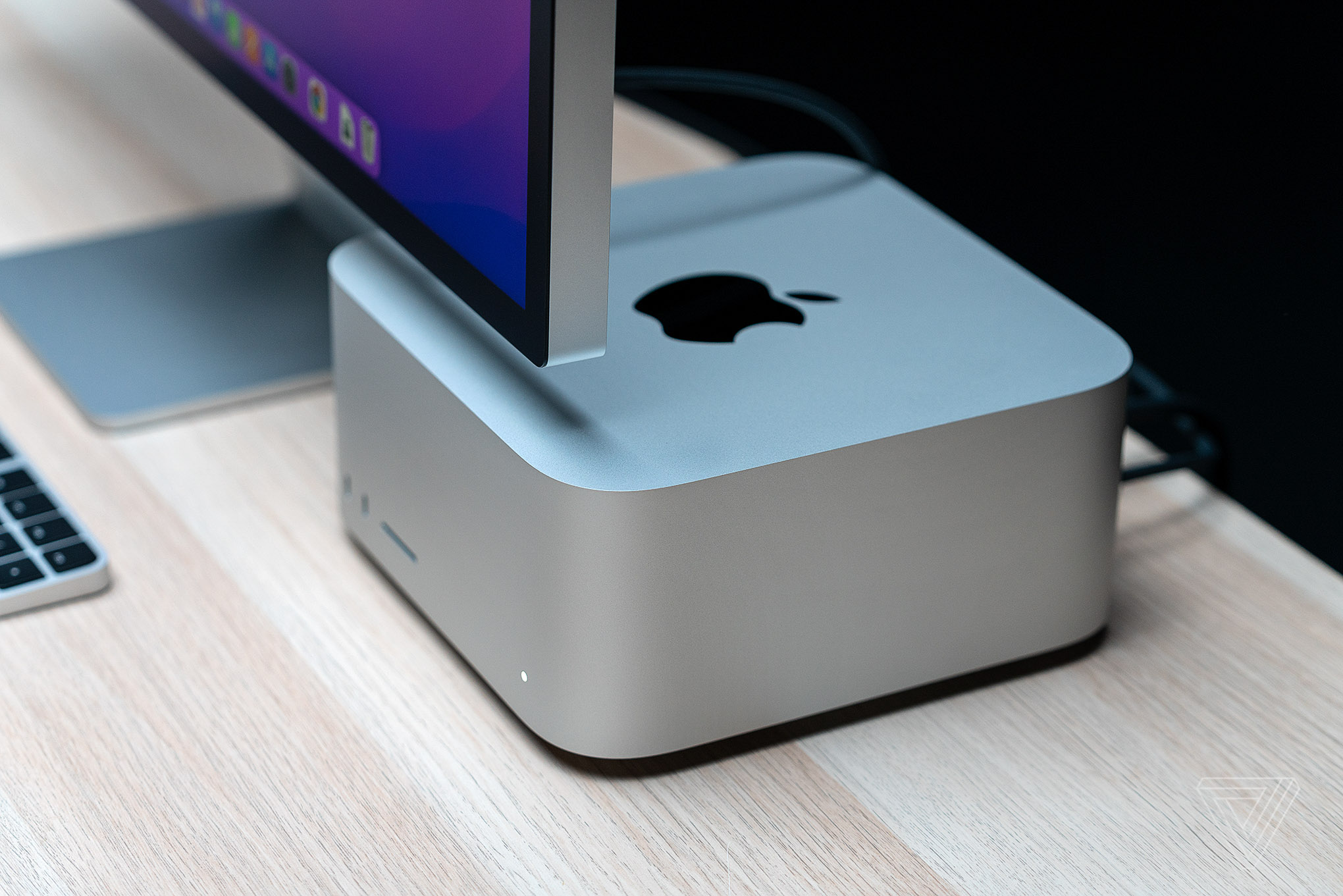
Let me say that again, because it deserves emphasis. Not a rented GPU cluster. Not a cloud region. Two Mac Studios.
On Thursday, October 15, 2026, Meta released Muse Spark Open, the open-weight version of its Muse Spark model. And unlike every frontier-model launch that ends with "available via our API," this one ships with instructions for running the whole thing on hardware a team can actually own. I've spent the day going through Meta's research blog, the press coverage, the benchmark tables, and the license terms. Here's what I found, and what it means for developers like us.
What Meta actually announced
Let's start with the raw specs, because they're genuinely impressive. Muse Spark Open is a Mixture-of-Experts (MoE) model with 816 billion total parameters, of which 42 billion are active per token (256 experts, 8 routed per token). It's natively multimodal — it takes text, image, video, and audio as input — and it holds a 1-million-token context window. That's roughly 750,000 words of context in a single prompt — enough to swallow an entire codebase and still remember the first page.
Meta's own billing calls it the "most capable US open-weight model to date." Now, take that with a grain of salt — that claim rests on Meta's own evaluation table, not independent testing, as several outlets were quick to point out. But even the skeptical coverage agrees: this is a serious model, built specifically for coding and long-horizon agentic work — the kind of multi-step reasoning where an AI doesn't just answer a question but carries out an extended task.
Under the hood, it's a 62-layer MoE model with grouped-query attention, a 1.8-billion-parameter perception encoder for visual input, and training data covering 100+ languages. There's a reasoning_effort knob — low to xhigh — controlling how deep the model thinks before answering.
The Mac Studio part is the actual story
Meta didn't just publish the weights and walk away. The company worked directly with Apple to optimize the model for Mac Studio with the M5 Ultra chip, using the latest version of MLX — Apple's open-source array framework built for Apple silicon's unified memory architecture.
Why does that matter? An 816-billion-parameter model is enormous, and Apple's unified memory architecture lets the M5 Ultra's integrated GPU use up to 512 GB of memory per Mac Studio, so two machines can hold the entire model. The chip's 1.2 TB/s of memory bandwidth is fast enough to read the small slice each token needs — in Meta's words, two Mac Studios behave like one supercomputer with a terabyte of unified memory.
Let that sink in. A model of this scale has never shipped with instructions for running it entirely on desktop hardware. The reported numbers: roughly 25 tokens per second on two Mac Studios and about 37 on four in 4-bit tests. Not blazing — slower than a cloud API — but local. Your code, your data, your documents never leave the room.
The catch isn't small, though. The 512GB Mac Studio configuration isn't even released yet — expected later this month — and the 256GB version is already priced at over $10,000. So a two-machine setup is a $20,000+ investment before you've generated a single token. Not a hobbyist setup. But for a team or a studio, owning the hardware outright instead of renting GPU time by the hour is a real economic proposition — and it's one that's never existed at this scale before.
What it can actually do (the demos that matter)
Spec sheets are one thing; I always look for what the company was confident enough to demo. Meta paired Muse Spark Open with Muse Code, its AI coding terminal, and ran agentic workflows entirely on-device. Two examples stood out to me:
Real iOS development, end to end. The model made changes to Ice Cubes, an open-source Mastodon client — bug fixes, new features, and a full build. A real iOS codebase, carried from "here's the issue" through to a compiled build.
Video editing as an agent task. The model drove DaVinci Resolve, reviewing footage frame by frame to find the strongest moments and cropping them vertically. If you've ever reformatted horizontal footage for vertical platforms, you know exactly how painful that job is.
These are long-horizon, multi-step tasks with real tooling. That's the "agentic" promise everyone keeps talking about, and it's the first time I've seen it demonstrated with a model this large running on desktop hardware.
The benchmarks: strong on agents, mid-pack on code
Now for the honest part. Meta published its own comparison table, and the numbers tell a nuanced story.
On agentic tool use, Muse Spark Open looks genuinely strong — it posted an 89.2 on MCP-Atlas, the top score in Meta's table. That's the kind of benchmark that measures whether a model can actually use tools to get things done, which lines up with the "built for agentic work" positioning.
On pure coding benchmarks, it's more mid-pack among large open models. On Terminal-Bench 2.1, it scored 76.4 — behind Kimi K3 (85.0), GLM 5.3 (83.9), and Qwen3.8 (82.0). Its edge is the agentic side: planning, tool use, and sticking with a long task.
The license fine print: "open" with an asterisk
This is the section I almost skipped, and I'm glad I didn't, because it matters.
The weights are free to download from Hugging Face, Google Cloud Model Garden, Amazon SageMaker AI, and Microsoft Foundry Models, and the model is available through API providers including Baseten, Fireworks AI, Groq, Modal, Nebius, OpenRouter, and Together AI. It runs on inference engines like vLLM, TensorRT-LLM, SGLang, Apple's MLX, and llama.cpp.
But it ships under Meta's own Muse Model License, which carries what Meta calls "limited commercial terms." The key clause: companies with more than $20 million in revenue have to notify Meta and sign a separate agreement before offering the model as a service. The license also requires attribution and bars certain sensitive uses.
So: free to download, free for many developers and smaller companies to use and build on — but not the kind of wide-open license where a giant cloud provider can just resell it as a service without talking to Meta first. If you're an indie developer, a freelancer, or a small agency, you're in the clear. If you're building a hosted AI product at scale, read the license carefully before you commit.
What this means for developers like us
Okay, opinion time. I've been building with AI tooling for a while now, and here's what I actually think about this launch.
First, the local-AI trend just got its biggest proof point. We've been watching local models get better for two years — from small quantized models on laptops to serious coding assistants on workstations. Muse Spark Open is the first time a model anywhere near the frontier has been designed for desktop deployment. That changes the conversation from "can I run a decent model locally?" to "can I run a frontier-class agent locally?" The answer is now, technically, yes — if you can afford the hardware.
Second, privacy and data control are the real selling points. For agencies, freelancers, and anyone handling client code or sensitive documents, the cloud-API model has always had an awkward truth: your client's proprietary code goes to someone else's server. A local 816B model doesn't solve everything — you still need expertise to run it — but it removes the data-leaves-the-building problem entirely.
Third, the agentic angle is what makes it relevant to our work. The Ice Cubes demo — bug fixes, features, full build, on-device — is the shape of where development tooling is going. Not autocomplete, but a coworker that takes a ticket and comes back with a build. We're not there yet, obviously. But every release like this one moves the "not yet" a little closer.
Fourth, don't ignore the NVIDIA/AMD side. Meta also shipped custom GPU kernels with meaningful speedups on NVIDIA and AMD hardware, and the NVFP4 build runs on 4 Blackwell Ultra GPUs or 8 H200s. This isn't just a Mac story — it's a "run serious open models on hardware you own" story.
The honest caveat: for most of us, the practical way to use this model on day one is still through an API provider — Groq, Together, Fireworks, OpenRouter, and the rest all have it. The two-Mac-Studio setup is a statement about where things are headed, not a shopping list for this weekend.
My take: the most important AI release of the month
I'll say it plainly: I think this is the most significant AI release of October, and it's not close — not because the parameter count is the biggest, but because of what it represents. For years, the frontier of AI has lived behind APIs, in data centers, on someone else's terms. Every developer building with AI has accepted that deal because there was no alternative at the top end.
Muse Spark Open is the first crack in that deal. The $20M license clause shows Meta still wants control of the biggest commercial plays — this isn't charity — but for the rest of us, it's a genuine expansion of what's possible without asking a cloud provider for permission.
The benchmarks say it's best-in-class at agentic tool use and merely good at raw coding. The hardware requirements say it's for teams, not hobbyists — today. But hardware gets cheaper and quantization gets better. The direction is unmistakable: the frontier is coming to the desktop.
If you're a developer, here's what I'd actually do this week: try it through one of the API providers first — the zero-cost way to feel what a 1M-context agentic model does to your workflow. Feed it a real repo. Give it a real multi-step task. Then decide whether local deployment is a 2026 project or a 2027 one for you.
The supercomputer on the desk isn't a metaphor anymore. It's a shopping list. An expensive one — but a shopping list.
Frequently asked questions
What is Muse Spark Open?
Muse Spark Open is Meta's open-weight AI model released on October 15, 2026 — an 816-billion-parameter Mixture-of-Experts model with a 1-million-token context window, built for coding and long-horizon agentic tasks. Meta calls it the most capable US open-weight model to date.
Can I really run it on a Mac?
Yes — that's the headline. Meta optimized it for Mac Studio with the M5 Ultra chip using Apple's MLX framework. Two Mac Studios with 512GB of unified memory each can hold the entire model, running at roughly 25 tokens per second. Four machines push that to about 37 tokens per second.
Is it actually free?
The weights are free to download, and the license allows limited commercial use. But there's a catch: companies with over $20 million in revenue must notify Meta and sign a separate agreement before offering the model as a service. Smaller developers and businesses can use it freely.
How does it compare to other open models?
It's strongest on agentic tool use (top score on MCP-Atlas in Meta's testing) and mid-pack on pure coding benchmarks — behind models like Kimi K3, GLM 5.3, and Qwen3.8 on Terminal-Bench 2.1. Its advantage is long-horizon, multi-step work, not winning every coding benchmark.
Where can I try it?
Through API providers including Groq, Together AI, Fireworks AI, Baseten, Modal, Nebius, and OpenRouter — or download the weights from Hugging Face, Google Cloud Model Garden, Amazon SageMaker AI, or Microsoft Foundry Models and run it yourself.


